
What is a shoppable gallery? Shoppable feeds and images explained
A shoppable gallery is a set of photos or videos on your store where each one links to the products in it. How it works, the main kinds, and when to use one.
By Zegsu team4 min read
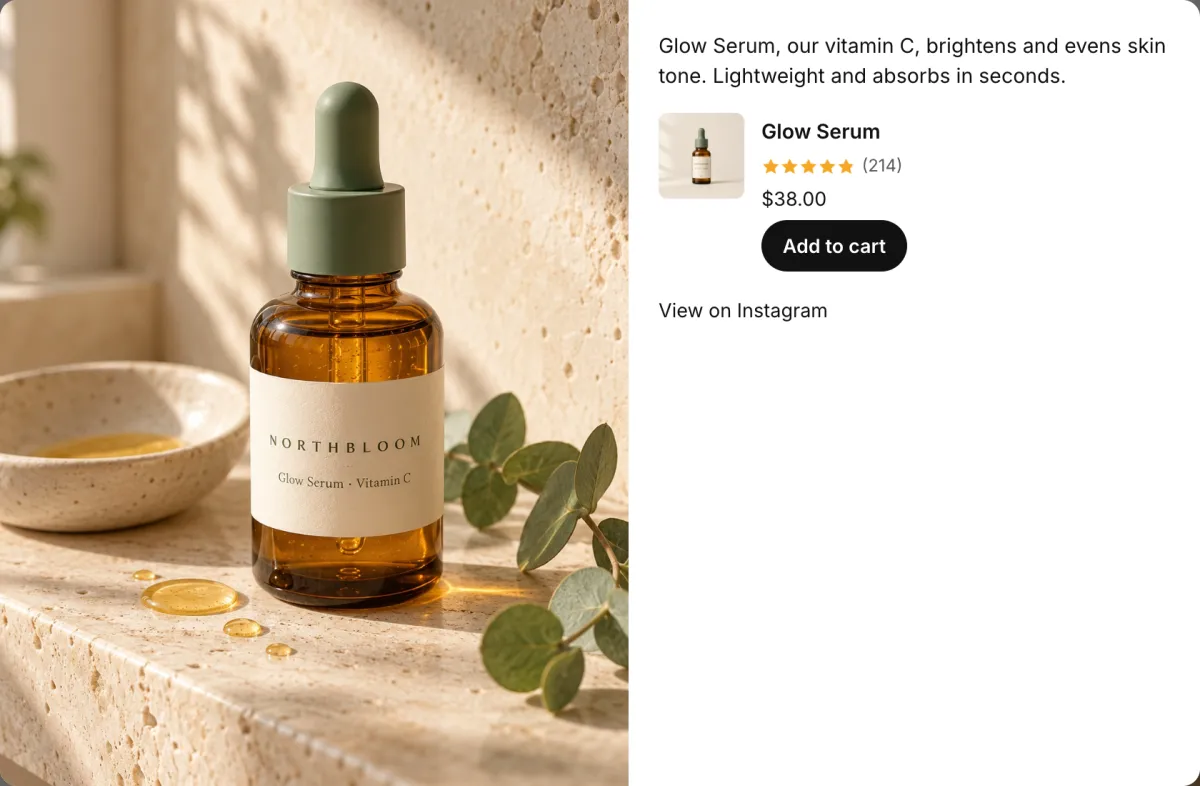
A shoppable gallery is a set of photos or videos on your online store where each picture is linked to the products shown in it. A shopper clicks a photo, sees the products with their prices, and can add them to cart or open the product page. You'll also hear it called a shoppable feed (when the pictures come from a social account and update on their own), shoppable images, shop the look, or more broadly shoppable content.
The idea is simple: people often see a product in use before they decide to buy it. A shoppable gallery puts the "buy" step next to that picture instead of making the shopper search for the product.
How a shoppable gallery works
Every shoppable gallery has the same three parts:
- The pictures. Your own photos and videos, posts and Reels from your Instagram account, or customer photos.
- The product tags. Each picture is linked to one or more products from your catalogue. Someone in your team adds the tags, or an app suggests them, for example from a caption that names the product.
- The shopping view. When a shopper clicks a picture, a popup or panel shows the tagged products with price, options and an add-to-cart button, or links to the product page.
The main kinds
| Kind | Where the pictures come from | Updates | Typical place on the store |
|---|---|---|---|
| Shoppable Instagram feed | Your Instagram posts, Reels and Stories | On its own as you post | Home page, product pages, a "Shop our Instagram" page |
| Lookbook or shop-the-look gallery | Your own campaign photos | When you upload new ones | Collection pages, a campaign landing page |
| Customer photo (UGC) gallery | Photos customers post or upload with reviews | As customers add them | Product pages, a reviews page |
| Shoppable video gallery | Your short videos, Reels or TikToks | On its own or by upload | Home page, product pages |
Many apps mix these: an Instagram feed app may also let you upload your own photos, and a reviews app may show customer photos as a gallery.
How it differs from related terms
- Shoppable post (on Instagram): a post with Instagram's own product tags, which people buy from inside Instagram. A shoppable gallery lives on your store. The two don't share tags; our guide to shoppable Instagram posts on Shopify explains both.
- Product image gallery: the photos of one product on its own product page. A shoppable gallery shows many pictures, each linking to whatever products are in it.
- Instagram feed (not shoppable): a grid of posts that links back to Instagram. It shows your brand but doesn't sell; adding product tags is what turns it into a shoppable gallery.
- Shoppable ads: paid ads with product links on social networks or retail sites. They work off your store; a shoppable gallery is on it.
When a shoppable gallery makes sense
It fits best when a picture of the product in use says more than the product photo:
- Products people want to see worn or styled, like clothing, jewellery, beauty and home decor.
- Products bought as a set, where one photo shows several items together, like an outfit or a styled shelf.
- Stores that already post often on Instagram, so the gallery fills itself without extra photo shoots.
- New launches, where a few posts of the product in use help shoppers picture it.
It does less for products that look the same in every photo, like phone cables or refills, and for stores with few photos to show. A gallery with a handful of untagged posts takes up space without selling anything, so tag every post you show.
Tips for a gallery that sells
- Tag every picture. An untagged picture is decoration. If tagging by hand is the step you skip, use an app that tags from captions.
- Put it where shoppers decide. On the home page, one or two rows below your hero or featured collection. On product pages, show posts with that product.
- Keep the popup on the page. Letting shoppers add to cart without leaving the page keeps them browsing.
- Check it on a phone. Many shoppers browse on their phones, so tap through a post and add to cart as a shopper would.
- Watch what it does. Compare opens and adds to cart per post, and move the ones that work to the top.
Adding a shoppable gallery to Shopify
Shopify's themes don't include a shoppable gallery, so stores add one with an app. Our app, Zegsu Instafeed, turns your Instagram posts, Reels and Stories into a shoppable gallery: connect Instagram, pick a grid, slider, collage or hero layout, tag products on your posts and add the feed to any page from the theme editor. Shoppers add to cart from a popup without leaving the page. The Free plan tags up to 6 posts; Pro is $5.99 a month and adds unlimited tagging, auto-tagging from captions, Stories and product-page galleries that show only that product's posts.
For the setup steps, see how to add an Instagram feed to Shopify. To compare options, our Shopify Instagram feed apps comparison puts seven apps side by side, including ones that focus on lookbooks and customer photos.