
Upsell vs cross-sell: the difference, with Shopify examples
An upsell offers more or better of what the shopper is buying; a cross-sell adds something that goes with it. Shopify examples and how to start.
By Zegsu team6 min read
An upsell asks the shopper to buy a bigger, better or larger quantity of the thing they already want. A cross-sell asks them to add something different that goes with it. Upgrading from a 250 g bag of coffee to a 1 kg bag is an upsell. Adding a grinder to the bag of coffee is a cross-sell.
Both raise the value of an order. The difference matters because each one works best at a different moment, and a shop that mixes them up tends to show the wrong offer at the wrong time.
Upsell vs cross-sell at a glance
| Upsell | Cross-sell | |
|---|---|---|
| What you offer | More of the same, or a better version | A different product that goes with it |
| Shopper's question | "Is the bigger one worth it?" | "Do I need this too?" |
| Example | 1 kg of coffee instead of 250 g | A grinder with the coffee |
| Typical Shopify formats | Quantity breaks, bundles of the same item, a premium variant, a post-purchase "add another" offer | Frequently bought together, cart recommendations, add-ons, free gift with a related product |
| Best moment | On the product page, while they choose | In the cart and after purchase, once the main decision is made |
| Main risk | Pushing a jump that feels too big, so they leave | Showing unrelated products, so the offer feels like noise |
What an upsell looks like on Shopify
An upsell works while the shopper is still deciding how much to buy. On a Shopify store that usually means one of these:
- Quantity breaks. "Buy 2, save 10%. Buy 3, save 15%." The shopper picks a quantity right above the add-to-cart button. Our guide to quantity breaks shows how to set the tiers.
- A bigger size or a premium variant. The 1 kg bag next to the 250 g bag, with the price per 100 g shown so the better deal is easy to see.
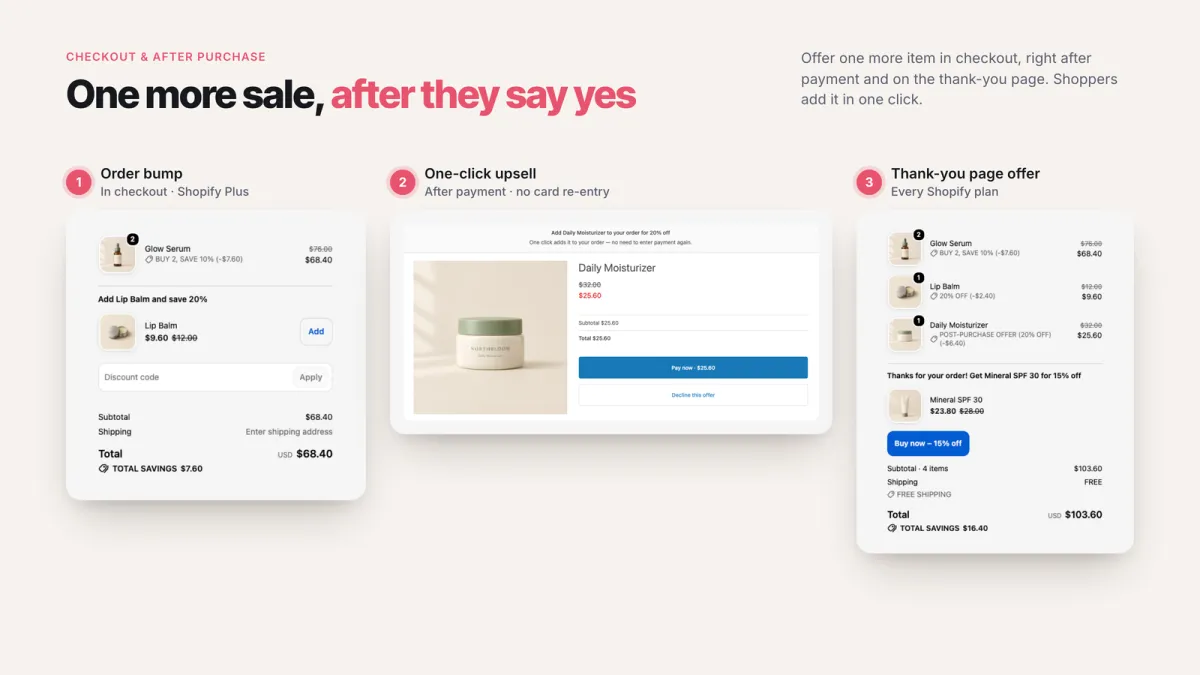
- A one-click offer after payment. On Shopify's post-purchase page, a shopper who just bought one candle can add a second one at a lower price without entering their payment details again. Shopify describes this page as appearing "after the order is confirmed, but before the Thank you page" (Shopify developer docs).
Keep the step small. Going from one item to two or three works much better than offering a product that costs four times as much.
What a cross-sell looks like on Shopify
A cross-sell works once the main choice is made. The shopper has the coffee; now the question is what goes with it.
- Frequently bought together on the product page: the coffee, a filter pack and a mug, with one button to add all three.
- Cart recommendations. A cart drawer that shows two or three related products, often with a small discount to make them worth adding.
- Add-ons. Gift wrap, an extended warranty or shipping protection, as a checkbox in the cart.
- Free gift with purchase. Spend $50 and get a free sample of a related product. It nudges the order up and introduces a product the shopper might buy next time.
- Thank-you page offers. A related product on the order confirmation page, while the shopper is still on your site.
The rule for cross-sells is relevance. A grinder next to coffee makes sense. A random best-seller next to coffee is just noise.
Which one should you start with?
It depends on what you sell:
| If your store… | Start with | Why |
|---|---|---|
| Sells consumables people reorder (coffee, skincare, supplements) | Upsell: quantity breaks | Shoppers already expect to need more |
| Sells one main product with accessories (cameras, bikes, phones) | Cross-sell: frequently bought together | The accessories are what they buy next anyway |
| Has many low-priced items (stickers, socks, candles) | Cross-sell: cart recommendations plus a free-shipping goal | Small items add up easily in the cart |
| Has few products and loyal buyers | Upsell after payment: a one-click offer on the post-purchase page | The buyer has just said yes, so a small extra is easy |
Most stores end up using both: an upsell on the product page and a cross-sell in the cart or after checkout.
How to set up your first upsell and cross-sell
- Pick one best-selling product. Look at what sells most in Shopify Analytics. Offers on a product that already sells get seen.
- Add one upsell on its product page. Quantity breaks are the simplest: 2 items at 10% off, 3 at 15% off. Check the margin on the deepest tier first.
- Add one cross-sell in the cart. Choose one or two products that genuinely go with it, not just your other best-sellers.
- Leave checkout alone at first. Offers inside Shopify's checkout steps need Shopify Plus. The post-purchase page and the Thank you page don't have that limit, so start there if you want an offer after payment.
- Let it run for two to four weeks, then compare average order value with the weeks before. Change one thing at a time.
Doing both with one app
Most Shopify upsell apps cover one surface: a cart drawer, a bundle widget or a post-purchase funnel. That's why many stores end up paying for three or four apps.
Our app, Bundles & Cart Drawer, covers both kinds of offer in one place: quantity breaks, BOGO and bundles on the product page; a cart drawer with recommendations, add-ons and a rewards bar; and offers in checkout (Plus), on the Thank you page and after payment. It's free, with no order or revenue limits. Discounts run on Shopify Functions, so prices are right in the cart and at checkout without discount codes.
If you'd rather compare options first, our roundups of the best Shopify upsell apps and the best Shopify bundle apps list the main apps, with prices as listed on the Shopify App Store. You can find our app on the Shopify App Store, and setup help is in the help center.
Common questions
Is a bundle an upsell or a cross-sell?
It depends on what's in it. A bundle of three of the same product ("3-pack") is an upsell: more of the same thing. A bundle of different products that go together ("coffee + grinder + mug") is a cross-sell.
Is a free gift with purchase a cross-sell?
Usually, yes. The gift is a different product, and the spending threshold encourages a bigger order. It works best when the gift relates to what the shopper is buying.
Do upsells annoy customers?
They do when the offer is irrelevant or the jump is too big. Small, clearly useful offers (a second unit at a discount, a matching accessory) read as help. Limit yourself to one offer per page, and make "no thanks" easy to find.
Do I need Shopify Plus for upsells?
Not for most of them. Product page offers, cart offers, the post-purchase page and the Thank you page work without Plus. Only offers inside the checkout steps (information, shipping and payment) need Shopify Plus.
Sources
- Shopify developer docs, About product offers (pre-purchase and post-purchase offers, where the post-purchase page appears).
- Shopify developer docs, Checkout UI extensions (checkout-step extensions are Shopify Plus only).
- Shopify Help Center, Discount combinations.